Zed my way
I love trying out new text editors, don't ask me why because when I get used to one, something new comes out that I want to try—that's just the way it goes, I guess.
This time I am trying out Zed "The editor for what's next" written in Rust.
Zed is a next-generation code editor designed for high-performance collaboration with humans and AI.
I must admit it's pretty sweet. But not as sweet as LazyVim which is currently my daily driver. So coming from LazyVim, I wanted to get Zed close to my LazyVim experience, allowing me to get up to speed quicker than I would otherwise. Similar to LazyVim, Zed is managed by a bunch of dotfiles.
Here are my dotfiles for my Zed setup. I mainly write in Python, Go, and YAML. Being a homelabber, I spend a lot of time in Docker and Kubernetes manifests. Setting up YAML is important to me; currently with this setup I have yet to get Kubernetes completion sorted, but that is a task for another day.
Python and Go work well though—Go is simply awesome in terms of getting editors set up.
settings.json
// settings.json
{
  "agent": {
    "always_allow_tool_actions": true,
    "default_model": {
      "provider": "copilot_chat",
      "model": "claude-sonnet-4"
    },
    "model_parameters": []
  },
  "diagnostics": {
    "inline": {
      "enabled": true
    }
  },
  "inlay_hints": {
    "enabled": true
  },
  "buffer_font_family": "JetBrainsMono Nerd Font Mono",
  "ui_font_family": ".ZedSans",
  "icon_theme": "Catppuccin Mocha",
  "vim_mode": true,
  "cursor_blink": false,
  "relative_line_numbers": true,
  "scroll_beyond_last_line": "off",
  "scrollbar": { "show": "never" },
  "ui_font_size": 16.0,
  "buffer_font_size": 14.0,
  "theme": {
    "mode": "system",
    "light": "One Light",
    "dark": "Catppuccin Mocha (blue)"
  },
  // Indentation, rainbow indentation
  "indent_guides": {
    "enabled": true,
    "coloring": "indent_aware"
  },
  "languages": {
    "Python": {
      "language_servers": ["ruff", "basedpyright", "!pyright"],
      "formatter": [
        { "code_action": "source.organizeImports.ruff" },
        { "code_action": "source.fixAll.ruff" },
        {
          "language_server": {
            "name": "ruff"
          }
        }
      ]
    }
  },
  "lsp": {
    "basedpyright": {
      "settings": {
        "basedpyright.analysis": {
          "diagnosticMode": "workspace",
          "inlayHints": {
            "callArgumentNames": false
          }
        }
      }
    },
    "gopls": {
      "initialization_options": {
        "gofumpt": true
      }
    },
    "yaml-language-server": {
      "settings": {
        "yaml": {
          // "keyOrdering": true,
          "completion": true,
          "format": {
            "enabled": true,
            "singleQuote": true
          },
          "schemaStore": { "enable": true },
          "schemas": {
            "kubernetes": "**/*.yaml"
          },
          "editor": { "tabSize": 4 }
        }
      }
    }
  }
}
Keymappings
After doing some googling, I came across this awesome post where xheisenbugx had created keymappings similar to those of LazyVim for his Zed setup. The below is 99.9% from that post—I have adjusted it slightly for my needs, but these work really well.
// keymaps.json
[
  // Terminal
  {
    "context": "Workspace",
    "bindings": {
      "space f t": "workspace::ToggleBottomDock"
    }
  },
  // Window's navigation
  {
    "context": "Dock || Terminal || Editor",
    "bindings": {
      // Window's motions
      "ctrl-h": "workspace::ActivatePaneLeft",
      "ctrl-l": "workspace::ActivatePaneRight",
      "ctrl-k": "workspace::ActivatePaneUp",
      "ctrl-j": "workspace::ActivatePaneDown"
    }
  },
  {
    "context": "GitPanel",
    "bindings": {
      "q": "git_panel::Close"
    }
  },
  {
    "context": "AgentPanel",
    "bindings": {
      "ctrl-\\": "workspace::ToggleRightDock",
      "cmd-k": "workspace::ToggleRightDock"
    }
  },
  // File panel (netrw)
  {
    "context": "ProjectPanel && not_editing",
    "bindings": {
      "a": "project_panel::NewFile",
      "A": "project_panel::NewDirectory",
      "r": "project_panel::Rename",
      "d": "project_panel::Delete",
      "x": "project_panel::Cut",
      "c": "project_panel::Copy",
      "p": "project_panel::Paste",
      // Close project panel as project file panel on the right
      "q": "workspace::ToggleLeftDock",
      "space e": "workspace::ToggleLeftDock",
      ":": "command_palette::Toggle",
      "%": "project_panel::NewFile",
      "/": "project_panel::NewSearchInDirectory",
      "enter": "project_panel::OpenPermanent",
      "escape": "project_panel::ToggleFocus",
      "h": "project_panel::CollapseSelectedEntry",
      "j": "menu::SelectNext",
      "k": "menu::SelectPrevious",
      "l": "project_panel::ExpandSelectedEntry",
      "o": "project_panel::OpenPermanent",
      "shift-d": "project_panel::Delete",
      "shift-r": "project_panel::Rename",
      "t": "project_panel::OpenPermanent",
      "v": "project_panel::OpenPermanent",
      "shift-g": "menu::SelectLast",
      "g g": "menu::SelectFirst",
      "-": "project_panel::SelectParent",
      "ctrl-6": "pane::AlternateFile"
    }
  },
  // Empty pane, set of keybindings that are available when there is no active editor
  {
    "context": "EmptyPane || SharedScreen",
    "bindings": {
      // New file
      "space f n": "workspace::NewFile",
      // Open recent project
      "space f p": "projects::OpenRecent",
      // Search in all the files
      "space s g": [
        "task::Spawn",
        { "task_name": "grep_search", "reveal_target": "center" },
      ],
      // Quit zed
      "space q q": "zed::Quit"
    }
  },
  {
    "context": "Workspace",
    "bindings": {
      "space g g": [
        "task::Spawn",
        { "task_name": "start lazygit", "reveal_target": "center" }
      ]
    }
  },
  {
    "context": "Workspace",
    "bindings": {
      "space k 8": [
        "task::Spawn",
        { "task_name": "start k9s", "reveal_target": "center" }
      ]
    }
  },
  // Fuzzy Finder
  {
    "context": "Workspace",
    "bindings": {
      "space space": [
        "task::Spawn",
        { "task_name": "file_finder", "reveal_target": "center" },
      ],
    },
  },
  // Grep Search
    {
      "context": "Workspace",
      "bindings": {
        "space s g": [
          "task::Spawn",
          { "task_name": "grep_search", "reveal_target": "center" },
        ],
      },
    },
  {
    "context": "Editor && VimControl && !VimWaiting && !menu",
    "bindings": {
      // Refactoring
      "space c r ": "editor::Rename",
      // Chat with AI
      "space a a": "assistant::ToggleFocus",
      "ctrl-\\": "workspace::ToggleRightDock",
      "cmd-k": "workspace::ToggleRightDock",
      "space a e": "assistant::InlineAssist",
      "cmd-l": "assistant::InlineAssist",
      "space a t": "workspace::ToggleRightDock",
      "space g h d": "editor::ExpandAllDiffHunks",
      "space g h D": "git::Diff",
      "space g h r": "git::Restore",
      "space g h R": "git::RestoreFile",
      // Toggle inlay hints
      "space u i": "editor::ToggleInlayHints",
      // Toggle soft wrap
      "space u w": "editor::ToggleSoftWrap",
      // Open markdown preview
      "space m p": "markdown::OpenPreview",
      "space m P": "markdown::OpenPreviewToTheSide",
      // Open recent project
      "space f p": "projects::OpenRecent",
      // Search word under cursor in current pane
      "space s w": "buffer_search::Deploy",
      // Search word under cursor in all panes
      "space s W": "pane::DeploySearch",
      // Tab things. Almost as good as harpoon.
      "space 1": ["pane::ActivateItem", 0],
      "space 2": ["pane::ActivateItem", 1],
      "space 3": ["pane::ActivateItem", 2],
      "space 4": ["pane::ActivateItem", 3],
      "space 5": ["pane::ActivateItem", 4],
      "space 6": ["pane::ActivateItem", 5],
      "space 7": ["pane::ActivateItem", 6],
      "space 8": ["pane::ActivateItem", 7],
      "space 9": ["pane::ActivateItem", 8],
      "space 0": "pane::ActivateLastItem",
      "] b": "pane::ActivateNextItem",
      "[ b": "pane::ActivatePreviousItem",
      "space ,": "tab_switcher::Toggle",
      // Jump to the previous location
      "space b b": "pane::AlternateFile",
      // Close buffer
      "space b d": "pane::CloseActiveItem",
      // Close inactive buffers
      "space b q": "pane::CloseInactiveItems",
      // New file
      "space b n": "workspace::NewFile",
      // Search in the current buffer
      "space s b": "vim::Search",
      // Search in all the files
      "space s g": [
        "task::Spawn",
        { "task_name": "grep_search", "reveal_target": "center" },
      ],
      "space f n": "workspace::NewFile",
      // Search
      "space /": "workspace::NewSearch",
      // Git
      "space g b": "git::Blame",
      // LSP & Code actions
      "space c a": "editor::ToggleCodeActions",
      "space s d": "diagnostics::Deploy",
      "space s s": "outline::Toggle",
      // Format
      "space c f": "editor::Format",
      // File explorer
      "space e": "workspace::ToggleLeftDock",
      // Telescope
      "space f f": "file_finder::Toggle",
      // Quit zed
      "space q q": "zed::Quit",
      // Terminal
      "space t": "workspace::ToggleBottomDock",
      // Windows management
      "space w s": "pane::SplitDown",
      "space w v": "pane::SplitRight",
      "space -": "pane::SplitDown",
      "space |": "pane::SplitRight",
      "space w c": "pane::CloseAllItems",
      "space w d": "pane::CloseAllItems",
      // Jump to hunks
      "] h": "editor::GoToHunk",
      "[ h": "editor::GoToPreviousHunk",
      "] c": "editor::GoToHunk",
      "[ c": "editor::GoToPreviousHunk",
      // Jump to diagnostic
      "] d": "editor::GoToDiagnostic",
      "[ d": "editor::GoToPreviousDiagnostic",
      "] e": "editor::GoToDiagnostic",
      "[ e": "editor::GoToPreviousDiagnostic",
      // Excerpts
      "] q": "editor::MoveToStartOfNextExcerpt",
      "[ q": "editor::MoveToStartOfExcerpt"
    }
  },
  {
    "context": "Editor && vim_mode == visual && !VimWaiting && !VimObject",
    "bindings": {
      // Line's Motions
      "shift-j": "editor::MoveLineDown",
      "shift-k": "editor::MoveLineUp"
    }
  },
  // Center the cursor on the screen when scrolling and find all references
  {
    "context": "VimControl && !menu",
    "bindings": {
      "ctrl-d": ["workspace::SendKeystrokes", "ctrl-d z z"],
      "ctrl-u": ["workspace::SendKeystrokes", "ctrl-u z z"],
      "n": ["workspace::SendKeystrokes", "n z z z v"],
      "shift-n": ["workspace::SendKeystrokes", "shift-n z z z v"],
      "shift-g": ["workspace::SendKeystrokes", "shift-g z z"],
      "g r": "editor::FindAllReferences"
    }
  },
  {
    "context": "vim_operator == d",
    "bindings": {
      "o": "editor::ExpandAllDiffHunks",
      "r": "git::Restore"
    }
  },
  {
    "context": "vim_mode == normal || vim_mode == visual",
    "bindings": {
      "s": "vim::PushSneak",
      "S": "vim::PushSneakBackward"
    }
  },
  {
    "context": "vim_operator == a || vim_operator == i || vim_operator == cs",
    "bindings": {
      "b": "vim::AnyBrackets"
    }
  }
]
task.json
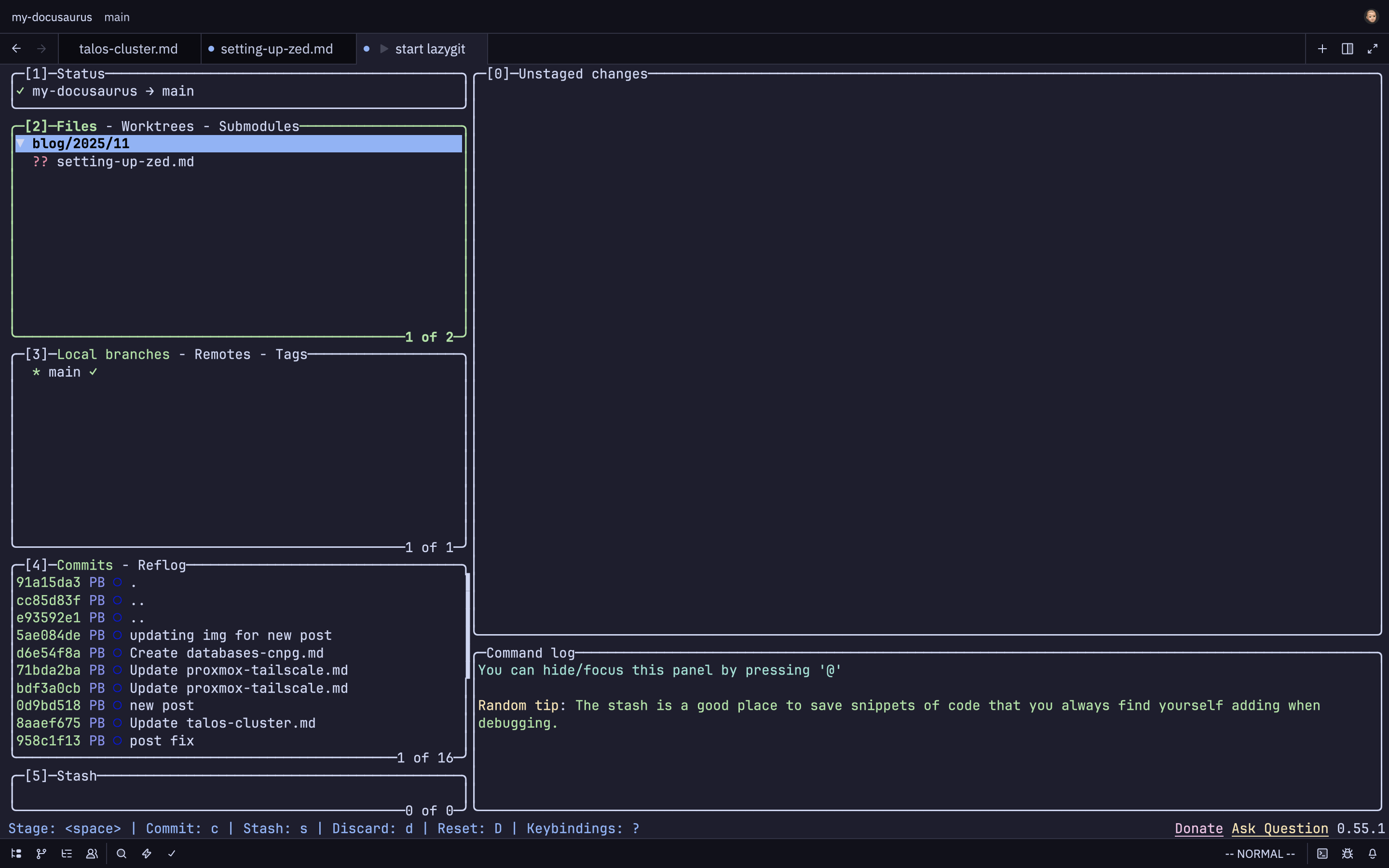
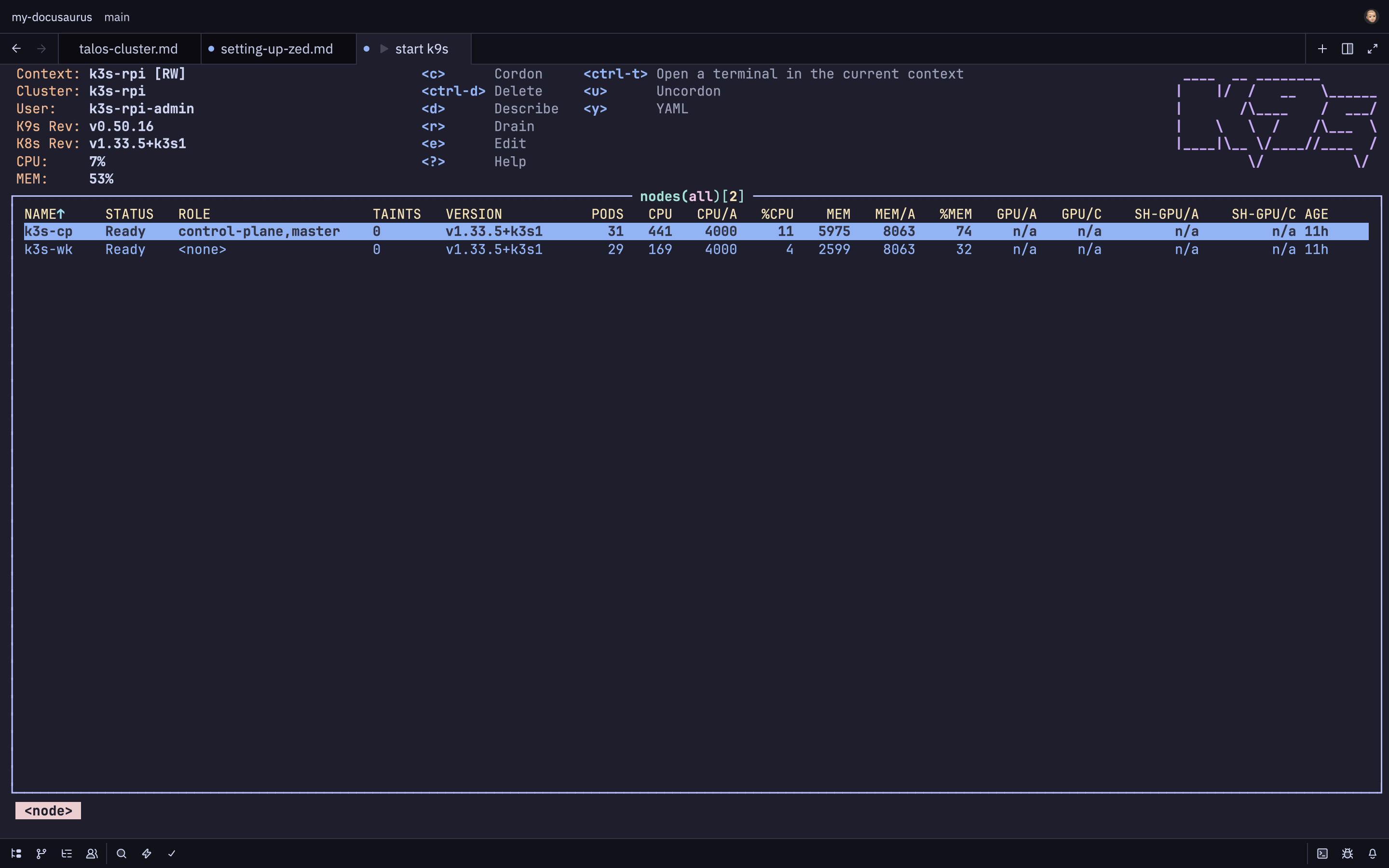
Here I have added a tasks.json file. Zed supports ways to spawn (and rerun) commands using its integrated terminal to output the results, which allows the user to open a full-screen terminal window. I have added the following to tasks.json—the command is what you would type into the terminal to open the specified application. For example:
$ lazygit
This would open the Lazygit TUI within your terminal window.
// tasks.json
[
  // task for starting lazygit
  {
    "label": "start lazygit",
    "command": "lazygit -p $ZED_WORKTREE_ROOT",
    "reveal": "always",
    "hide": "on_success"
  },
  // task for starting k9s
  {
    "label": "start k9s",
    "command": "k9s",
    "reveal": "always",
    "hide": "on_success"
  },
  //fuzzy finder
  {
    "label": "file_finder",
    "command": "zed \"$(tv files)\"",
    "hide": "always",
    "allow_concurrent_runs": true,
    "use_new_terminal": true,
    "shell": {
      "program": "/bin/zsh",
    },
  },
  // grep search
  {
    "label": "grep_search",
    // Use the command with the --exact flag to disable fuzzy search so it only gives you exact matches
    "command": "zed \"$(tv --exact text)\"",
    "hide": "always",
    "allow_concurrent_runs": true,
    "use_new_terminal": true,
    "shell": {
      "program": "/bin/sh",
    },
]
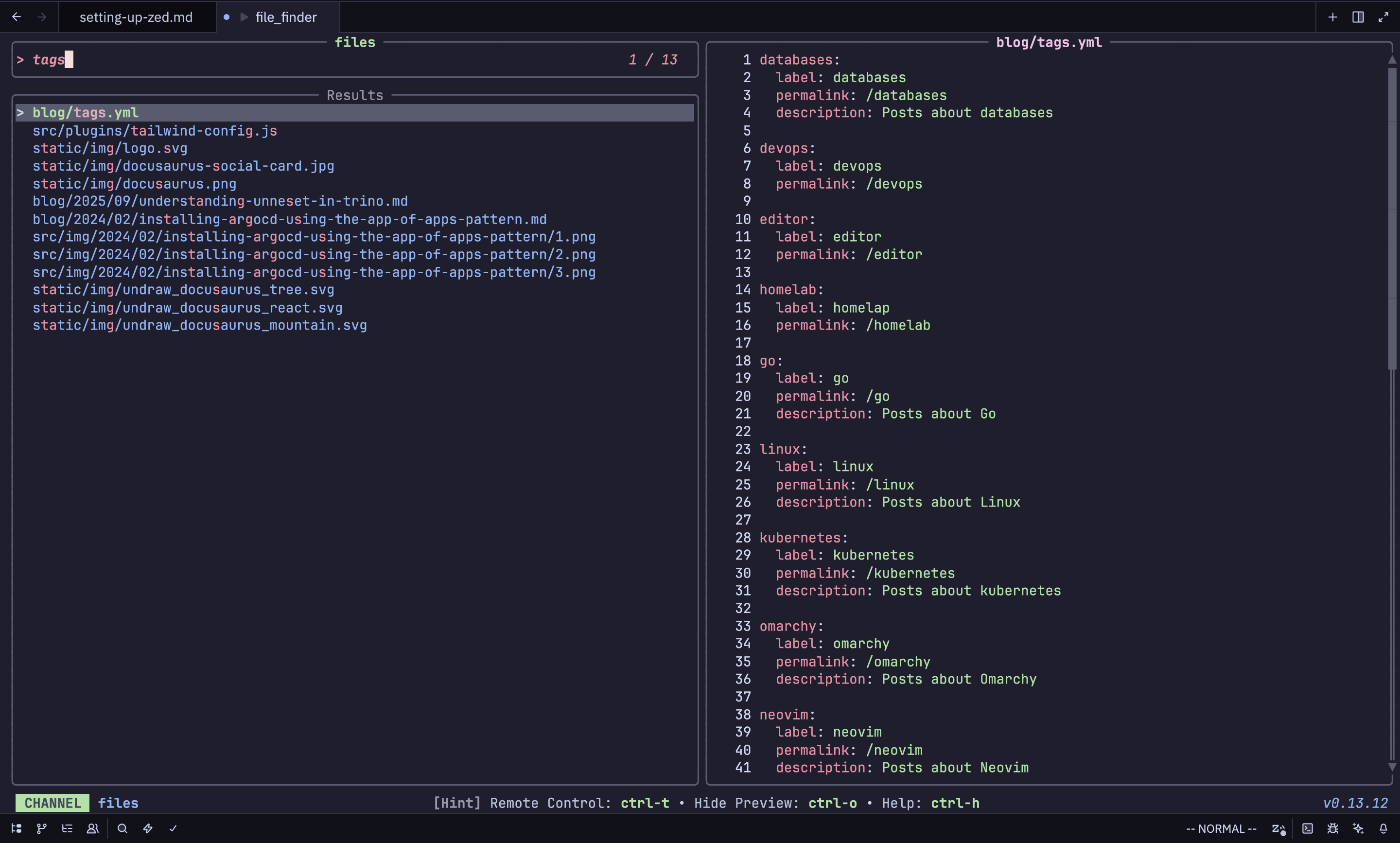
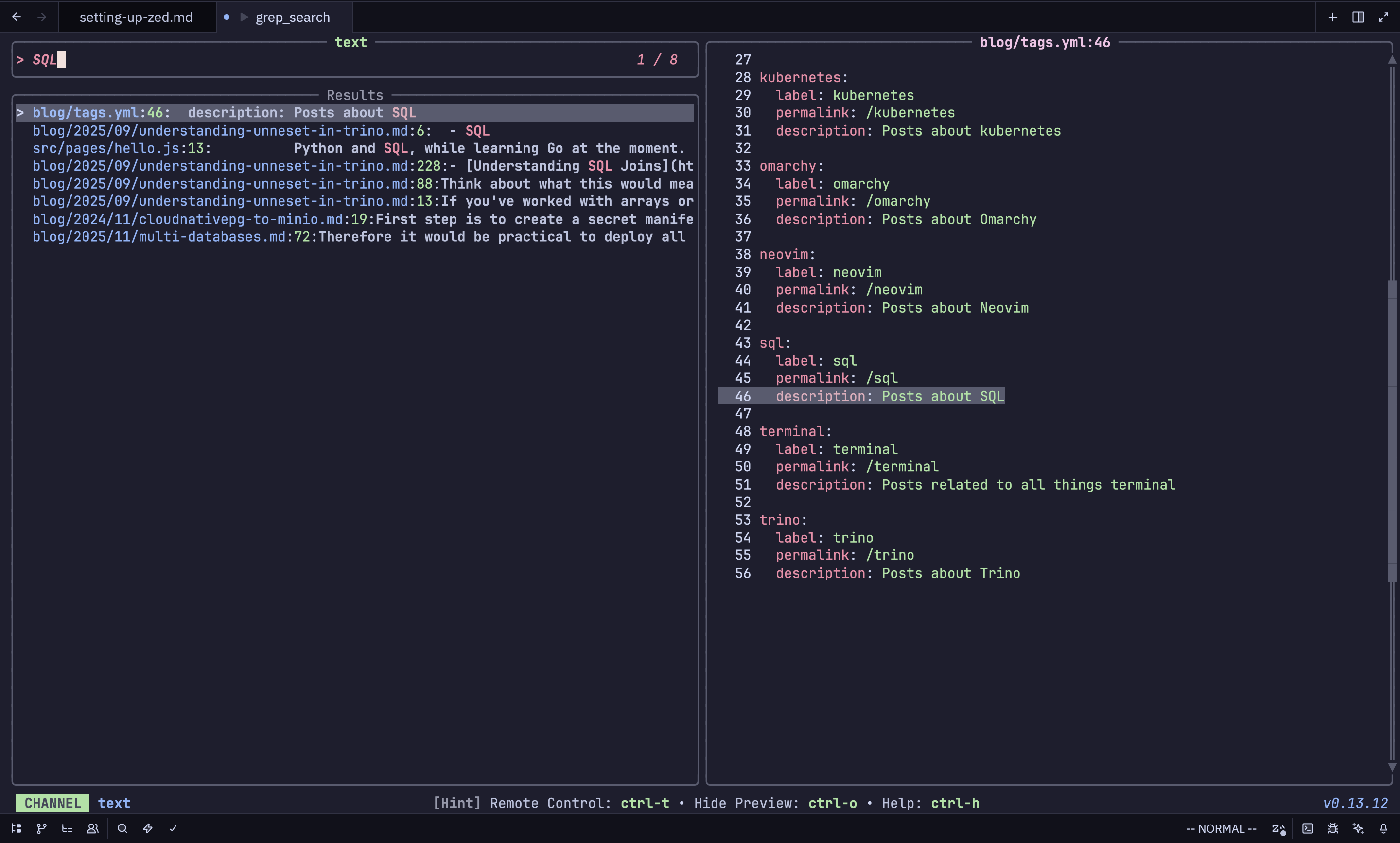
Below are a couple of screenshots of how K9s and Lazygit look when they're opened within Zed. Folloing on from this Github Discussion you're able to add fuzzy finder and grep search similar to what is provided by LazyVim. By using an app called telvision. Screen shots below:
Lazygit
Keymapping: space g g
K9s
Keymapping: space k 8
Fuzzy Finder & Grep Search
Keymapping: space space
Keymapping: space s g
Next steps
For me the next steps would be figuring out how I can replace the Kubernetes VSC extension with something that will give Zed the same functionality. As this allows me to connect to clusters and see Helm chart values.